A Plain-English Guide for Business Owners, Executives, and Non-Technical Managers
Cybersecurity has become a regular topic in board meetings, management discussions, and business planning. Hardly a week goes by without headlines about ransomware attacks, stolen customer data, phishing scams, or companies paying millions of dollars after suffering a cyber breach.
As a business leader, you don’t need to know how to write computer code or configure servers. However, you do need to understand the basic concepts that protect your company’s information. Making informed decisions about technology investments, approving security budgets, or evaluating risks becomes much easier when you understand the language your IT team and cybersecurity consultants use every day.
Unfortunately, many cybersecurity terms sound highly technical and intimidating. Words like encryption, tokenization, authentication, and digital certificates often create the impression that cybersecurity is something only engineers can understand.
The reality is quite different.
Most cybersecurity concepts can be explained using situations we encounter in everyday life. Once you understand these simple analogies, the technology becomes much less mysterious.
In this guide, we’ll explain three of the most important cybersecurity concepts—encryption, tokenization, and Two-Factor Authentication (2FA)—using practical examples and real-life metaphors that anyone can understand.
Why Cybersecurity Matters to Every Business
Imagine owning a retail store.
You would probably install:
- Strong locks
- Security cameras
- An alarm system
- Insurance
- Restricted employee access to the safe
You don’t install these protections because you expect to be robbed every day.
You install them because valuable assets deserve protection.
Digital information works exactly the same way.
Instead of protecting cash and inventory, modern businesses protect:
- Customer information
- Financial records
- Contracts
- Employee data
- Product designs
- Business strategies
- Emails
- Intellectual property
Cybersecurity simply means protecting these digital assets.
What Is Encryption?
Let’s begin with one of the most common cybersecurity terms.
Imagine Sending a Letter
Suppose you need to mail confidential financial documents to your accountant.
If you simply place the papers into a transparent plastic sleeve, anyone handling the package can read them.
Instead, you place the documents inside a sealed envelope.
Now people can still see the envelope, but they cannot read what’s inside.
Encryption works in much the same way.
Encryption Explained
Encryption converts readable information into unreadable data.
Only someone possessing the correct digital key can convert the information back into its original form.
Without that key, the information appears as meaningless characters.
Even if criminals steal encrypted files, they cannot easily understand their contents.
A Simple Safe Analogy
Think about a home safe.
You place jewelry, passports, and important documents inside.
Anyone can see the safe.
Very few people can open it.
Encryption works similarly.
The file remains visible.
Only authorized individuals possess the “combination” needed to unlock it.
Where Do We Use Encryption Every Day?
Most people already use encryption without realizing it.
Examples include:
- Online banking
- Credit card payments
- Shopping websites
- Messaging applications
- Email services
- Cloud storage
- Mobile banking apps
- Video conferencing platforms
Whenever you see a small padlock icon beside a website address, encryption is helping protect your information.
What Is Tokenization?
Tokenization is often confused with encryption.
Although both protect sensitive information, they work differently.

Imagine a Coat Check at a Restaurant
You arrive at an expensive restaurant.
The staff takes your coat and gives you a numbered ticket.
Your coat remains safely stored in another room.
The ticket itself has no value to anyone else.
If someone steals your ticket, they still don’t own your coat unless they can prove it belongs to them.
Tokenization works exactly like that ticket.
How Tokenization Works
Instead of storing sensitive information directly, the system replaces it with a random identifier called a token.
For example:
Instead of storing:
John Smith’s credit card number
The database stores:
ABX-5829-QW11
The actual payment information remains securely stored elsewhere.
Even if hackers steal the database, they obtain meaningless tokens rather than valuable financial information.
Why Businesses Use Tokenization
Tokenization is especially useful for protecting:
- Credit card numbers
- Payment information
- Customer identifiers
- Medical records
- Government identification numbers
Many payment processors use tokenization to reduce the amount of sensitive financial information merchants must store.
This reduces both cybersecurity risk and regulatory compliance requirements.
Encryption vs. Tokenization
Although both technologies protect information, they solve different problems.
Encryption hides the original information using mathematical algorithms.
Tokenization replaces sensitive information with a meaningless substitute.
Think of it this way:
Encryption locks the valuable object inside a secure safe.
Tokenization removes the valuable object entirely and leaves behind only a claim ticket.
Both methods improve security—but in different ways.
What Is Two-Factor Authentication (2FA)?
Now let’s examine another important security tool.
Think About Entering a Secure Office Building
Imagine your office requires two things before allowing entry.
First, you show your employee ID badge.
Second, you enter a personal PIN code.
Possessing only one is not enough.
Someone who steals your badge still cannot enter without knowing your code.
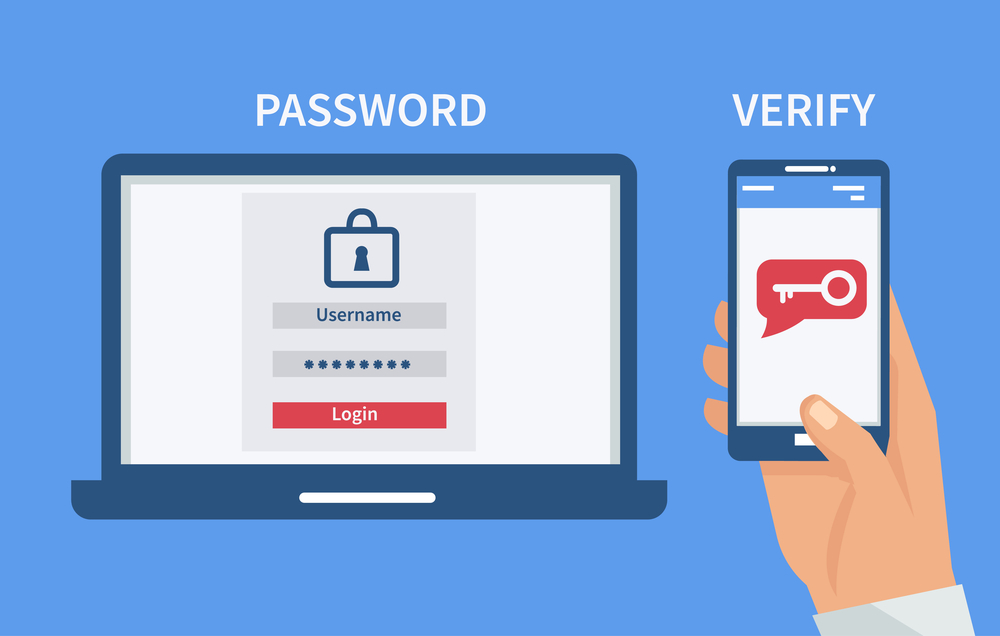
This is Two-Factor Authentication.
Understanding Two-Factor Authentication
Traditionally, logging into an online account required only one factor:
Your password.
Unfortunately, passwords can be:
- Stolen
- Guessed
- Purchased online
- Reused across websites
- Captured through phishing
Two-Factor Authentication adds a second layer of protection.
Even if criminals know your password, they still cannot access your account without completing another verification step.
The Three Types of Authentication Factors
Authentication usually relies on three categories.
Something You Know
Examples include:
- Passwords
- PIN numbers
- Security questions
Something You Have
Examples include:
- Smartphone
- Hardware security key
- Authentication application
- Smart card
Something You Are
Examples include:
- Fingerprint
- Face recognition
- Iris scan
- Voice recognition
Two-Factor Authentication combines two different categories rather than relying on a single password.
Everyday Examples of 2FA
You probably already use 2FA when:
- Logging into online banking
- Confirming online purchases
- Accessing work email
- Signing into cloud applications
- Managing social media accounts
You enter your password, then approve the login using your phone.
That second confirmation dramatically improves account security.
Why Passwords Alone Are No Longer Enough
Imagine locking your house with only one key.
If someone copies the key, they gain unrestricted access.
Adding a second lock makes unauthorized entry much more difficult.
The same principle applies to online accounts.
Modern cybercriminals specialize in stealing passwords.
Two-Factor Authentication significantly reduces the likelihood of successful account compromise.
How These Three Technologies Work Together
Encryption, tokenization, and Two-Factor Authentication each solve different security problems.
Think about protecting valuable jewelry.
Encryption places the jewelry inside a locked safe.
Tokenization replaces the jewelry with a numbered receipt stored elsewhere.
Two-Factor Authentication ensures that only the rightful owner can open the safe.
Used together, they provide much stronger protection than any single technology alone.
Common Misconceptions
Many business leaders assume cybersecurity is only the IT department’s responsibility.
In reality, leadership decisions determine:
- Security budgets
- Employee training
- Risk management
- Vendor selection
- Technology investments
- Company policies
Understanding these concepts helps executives make better strategic decisions.
Practical Advice for Business Managers
You don’t need to become a cybersecurity expert.
Instead, ask simple questions such as:
- Are our customer databases encrypted?
- Do employees use Two-Factor Authentication?
- Does our payment system use tokenization?
- Are backups protected?
- Who has access to sensitive information?
- How often do we review security policies?
These questions encourage meaningful conversations with IT teams and external security providers.
Why Simple Cybersecurity Knowledge Creates Better Businesses
Organizations that understand basic cybersecurity concepts often experience:
- Better risk management
- Stronger customer trust
- Lower financial losses
- Improved regulatory compliance
- Faster incident response
- More confident decision-making
Cybersecurity becomes a business enabler rather than merely an IT expense.
Looking Beyond Technology
Modern cybersecurity is not only about software.
It is equally about:
- People
- Processes
- Leadership
- Education
- Continuous improvement
Technology provides tools.
People decide how effectively those tools are used.
Business leaders play a critical role in building a security-conscious organizational culture.
Conclusion
Cybersecurity does not have to be confusing. Once complex technical terms are translated into familiar, everyday situations, they become much easier to understand. Encryption is like locking valuable documents inside a secure safe, ensuring that only authorized individuals can read them. Tokenization replaces sensitive information with a meaningless placeholder, much like a coat-check ticket represents your belongings without revealing or exposing them. Two-Factor Authentication adds an extra layer of identity verification, similar to needing both an employee badge and a PIN code before entering a secure office.
For business owners, executives, and managers, understanding these concepts is not about becoming an IT specialist. It is about making informed business decisions, asking the right questions, supporting sound cybersecurity investments, and fostering a culture where protecting digital assets becomes everyone’s responsibility. In 2026, cybersecurity literacy is no longer optional—it is an essential leadership skill that helps organizations safeguard their data, maintain customer trust, and remain resilient in an increasingly digital world.